





Google is testing a new feature that allows users to import their ChatGPT conversations into Google Gemini. The company is aiming to make switching between AI assistants easier for users around the world. The feature is currently in the beta version. It lets people export their chat history from ChatGPT and other AI tools, upload it into Gemini and continue from where they left off. This move could change how people move their personal AI data across platforms and preserve context, preferences and ongoing work. Check the article as we explain everything you need to know about this update.
Import AI Chats: Google’s Next Big Update
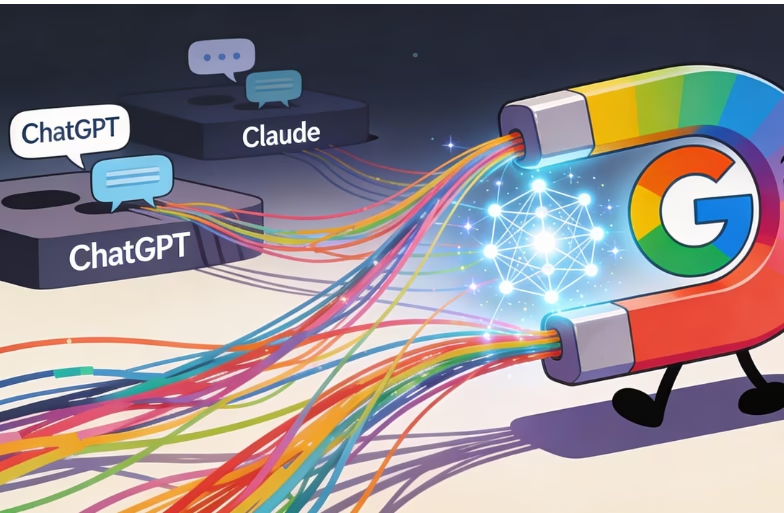
Google is currently building an “Import AI chats” feature inside its Gemini AI assistant. The goal is to let users upload a file containing past chat history from another AI platform like ChatGPT, and then continue those chats directly in Gemini. Instead of starting fresh, users will see their old conversations inside Gemini.
It is very similar to copying messages from one phone to another. Moreover, this feature is visible in early testing within Gemini’s attachment menu. It is not yet fully released to all users.
Features of Import AI chats
Many people use AI assistants for long-term tasks like projects, creative writing, research or planning. Over time, their old chats become a kind of memory bank filled with context, preferences and instructions. Without a way to bring this history into a new AI assistant, users often have to repeat the same details all over again. This can be frustrating and time-consuming. So, with the new import feature:
- Users keep the context and history of previous conversations.
- Ongoing projects continue without restarting.
- Preferences like writing style or personal guidance remain intact.
- Switching between AI platforms becomes less disruptive.
In simple words, it can be said that through this approach, Google is aiming to reduce the effort of “teaching” an assistant from zero every time you switch.
How It Works: Steps Based on Early Reports (Expected)
The exact steps for transferring chats have not been confirmed yet. However, according to a report by Mint, users may be able to export their ChatGPT history and then import it into Google Gemini.
- Export Your ChatGPT History: In this, you just have to download your ChatGPT data using the “export” feature.
- Open Gemini and Find Import Feature: In Gemini’s chat window, a new option labelled Import AI chats appears (in testing). It is typically found within the attachment menu.
- Upload the File: Next, you just have to upload the file you exported from ChatGPT. Gemini then reads the content and imports the chat history.
- Continue Conversations: Once uploaded, you can start new prompts or continue previous chats, now using Gemini’s capabilities and you’re good to go!
Privacy and Data Use
Google’s testing screens reportedly note that imported conversations and future chats are stored in your Gemini activity log. The data may also be used to help improve Google’s AI models. That means that imported content is part of Google’s training and activity data unless you delete it from your activity controls.
This could raise privacy considerations for some users, especially those who prefer private or controlled data handling when moving personal chat history between AI services.
Platforms Expected to Work with Gemini’s Import Feature
So far, reports say Gemini’s upcoming feature could allow importing chats from multiple AI platforms, including:
- ChatGPT (OpenAI)
- Claude
- Microsoft Copilot
- Grok
This means the feature may not be limited to ChatGPT alone, but available for users switching from various AI assistants.
Key Details Yet to Be Confirmed by Google
Because the Import AI Chats feature is currently in testing, several important details have NOT yet been confirmed. This includes the following points:
- Exactly which file formats Gemini will support.
- Whether all content types (like images or attachments) will transfer cleanly.
- How Gemini handles memory vs chat context (for example, saved memories vs chat history).
Until Google officially launches the feature, these points remain uncertain for users.
Conclusion
Google’s new “Import AI chats” feature for Gemini represents a big step toward AI interoperability. This makes it easier for users to switch assistants without losing context or history. It is especially useful for professionals, students and committed AI users who rely on long chat histories for complex work. While it is still in testing, the feature signals a shift in how AI platforms handle user data portability and user experience.
FAQs
1. Can I already use this feature today?
No. It is currently in beta/testing and not widely available to all users yet.
2. Do imported chats stay private?
Imported chats are saved in Gemini’s activity and may be used by Google for model improvements unless deleted. Users should check their privacy settings.
3. Will this import memories as well?
At present, it appears limited to chat history and not deeper “memory” features, although Google has developed other memory tools separately.
4. Which platforms can I import from?
The Import AI Chats feature works well for ChatGPT, Claude, Microsoft Copilot and others.
5. Do I lose anything when importing?
Imported content should preserve context, but exact support for attachments or special formats is not yet confirmed.