






In a move to strengthen digital identity services, the Government of India has launched the new Aadhaar App with a privacy-first and digital-first approach. The full version was unveiled during Republic Weekend and is now available on both the Google Play Store and the Apple App Store.
Features Of The New Aadhaar App
The Unique Identification Authority of India (UIDAI) led the launch of the updated Aadhaar App to strengthen India’s digital identity infrastructure. Some of the flagship features include:
Selective Sharing of Identity Attributes
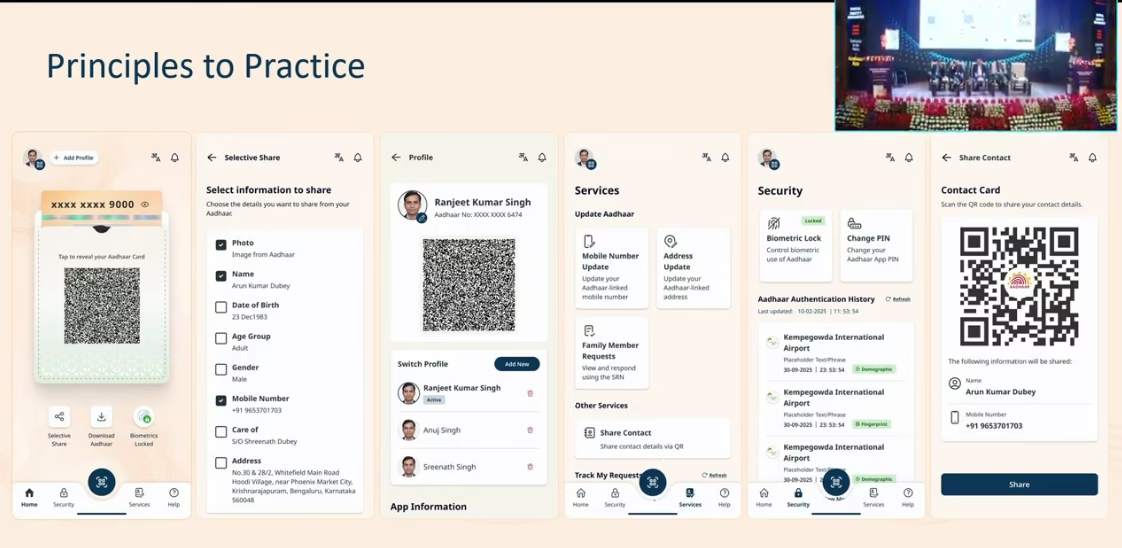
The new Aadhaar App allows users to choose which parts of their personal information they want to share during verification. For example, if someone only needs to prove their name or age, they can share just those details without revealing their full Aadhaar number or address. This selective sharing adds an extra layer of privacy and control for users. It also helps reduce the misuse of data and ensures that individuals reveal only what is necessary.
Up to Five Profiles
One of the most useful updates in the new Aadhaar App is the ability to create and manage up to five Aadhaar profiles on a single device. This feature is especially convenient for families, as it lets parents store their children’s or elderly members’ Aadhaar cards safely in one place. Each profile remains protected and can be accessed when needed for verification or online services.

Instant Verification
With the new Aadhaar App, verification has become much quicker and simpler. The app supports both QR-based and digital verification methods. This allows users to confirm their identity within seconds. This feature is especially helpful for banks, telecom providers and other institutions that depend on Aadhaar verification.
Update Mobile Number and Address
A major highlight of the new Aadhaar App is that users can now update important details such as their registered mobile number and address directly through the app. Earlier, such updates required a visit to an Aadhaar Seva Kendra or post office. Now, users can complete the process at home by using OTP verification and uploading the necessary documents.
User-Friendly Interface
The redesigned Aadhaar App focuses strongly on ease of use for all age groups. The layout is clean and the menus are simple to understand. Clear icons, light colours and straightforward options make navigation smooth.
Moreover, the app also supports privacy-first controls, so users reveal only what is necessary during verification.
Real-World Use Cases
Citizens are expected to benefit in the following everyday settings:
- Travel: Families can present digital Aadhaar QR codes for group verification. This cancels the need to carry multiple identity proofs.
- Service Access: Banks, government portals and telecom services can authenticate users faster.
- Mobile Number Changes: Updating the registered mobile numbers that are often essential for OTP-based services becomes quicker and more flexible.
Challenges And Considerations
While the new app promises simplicity, users will still require a registered mobile number and secure authentication to access all features. This means older Aadhaar holders without smartphones or stable mobile access may need support.
There are also ongoing public concerns about data privacy and digital identity security. The government asserts that the app employs strong safeguards to keep personal information secure.
Conclusion
The launch of the new Aadhaar App represents a great milestone in India’s digital journey. By bringing key Aadhaar services into a user-centric mobile interface, the Government seeks to make identity verification simpler, faster and more secure for all citizens.
FAQs
1. Is the new Aadhaar App different from mAadhaar?
Yes. The new Aadhaar App is a completely redesigned version of the earlier mAadhaar app. It offers a cleaner interface, better privacy controls, faster verification and more reliable performance.
2. Can I use the Aadhaar App without an internet connection?
Some features such as viewing your Aadhaar card and QR-based offline verification work without internet. However, features like updating details or logging in for the first time require an active internet connection.
3. Is it safe to share my Aadhaar QR code from the app?
Yes. The QR code generated by the Aadhaar App is digitally signed and encrypted by UIDAI. It contains only the information you choose to share and cannot be tampered with