







In today’s digital world, Instagram and Facebook don’t just collect information about what you do on their apps, they also get data from other websites and apps you visit. This shared data helps Meta (the parent company of Instagram and Facebook) show you more relevant ads and content.
But if you have ever wondered which websites are sending your data to Instagram, there is a simple way to check. Instagram has a built-in tool that lets you view, manage, or delete this shared data easily from your account settings. Check this article to know the full steps.
Prerequisites You Must Need
Before you begin, make sure you have the following:
- You’re logged into your Instagram account.
- You have the latest version of the Instagram app or access to a web browser.
- You’re connected to the internet.
Step-by-Step Guide to Managing Shared Data on Instagram
Just follow the steps shown below and manage your shared data on Instagram:
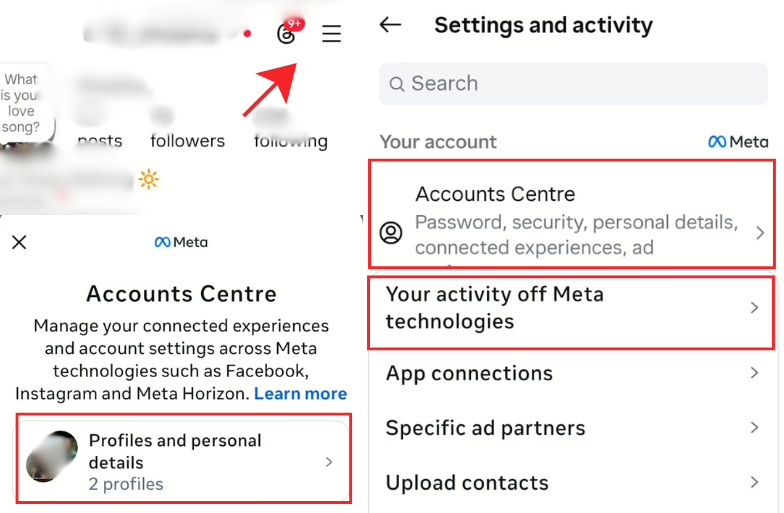
- Go to your profile on the Instagram App → Tap the 3 horizontal lines present at the top-right side → Choose “Accounts Centre”.
- Under this, click on the “Your information and permissions” option.
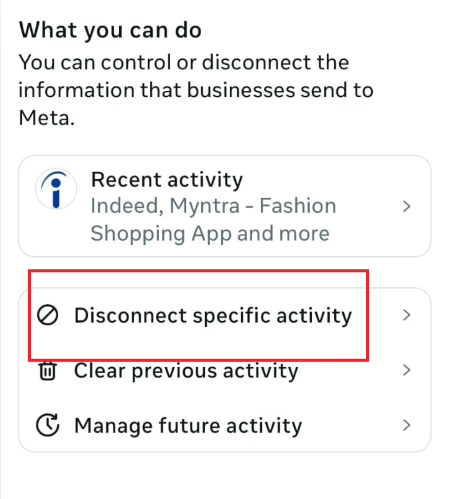
- Next, go to “Your activity off Meta technologies.” Here, you’ll see a list of websites and apps that have shared data with Instagram.
- If you don’t want a specific site sharing data anymore, just tap on that website → Choose Disconnect → Confirm. This stops that site from sharing any new data.
Now you know which websites share your data with Instagram and how to stop them if you want. By following these simple steps, you can take better control of your privacy and understand how your online activity is being used across platforms.


Why Instagram Collects Shared Data on Instagram?
You must know that whenever you visit a shopping website, read a blog, or log into a service using your Facebook or Instagram credentials, that site can share your activity with Meta. This is called “off-Meta activity.” This directly helps Meta understand your interests. For example, if you browse trainers on a website, you might later see similar ads on Instagram.
While this can make ads more relevant, it also raises privacy concerns. Many users prefer to have more control over what data is being shared and how it’s used. That is where the “Your activity off Meta technologies” feature comes in. So, the question is- have you ever checked which websites are silently sharing your data with Instagram? Let us know in the comments!
FAQs
Q1. What does “Your activity off Meta technologies” mean?
It shows which websites and apps share your interactions with Meta (Instagram and Facebook).
Q2. Is this data sharing safe?
Instagram says it doesn’t collect sensitive information like passwords or health details. The data is mainly used for ads and analytics.
Q3. Will removing these sites stop all ads?
No. You’ll still see ads, they just won’t be as personalized.
Q4. Does this stop Instagram from tracking me inside the app?
No, this feature only controls data from external websites or apps, not your activity within Instagram itself.


