



Your Aadhaar number is an important identity proof used across banks, government services and digital platforms. To add an extra layer of security, the Unique Identification Authority of India (UIDAI) now allows you to lock your Aadhaar. Once locked, you cannot use your Aadhaar number for authentication; instead, you can use a Virtual ID (VID) for verification. Let’s delve deeper into this to know the proper steps.
Prerequisites
Before locking your Aadhaar, ensure you have the following:
- Your Aadhaar number (UID)
- A registered mobile number linked with Aadhaar (to receive OTP)
- A 16-digit Virtual ID (VID). You can generate it from the UIDAI website or the mAadhaar app
There are mainly 2 steps to doing so. One is either through the mAadhaar App, and the other is through the UIDAI website. Let’s know about both processes for more clarity.
Lock Aadhaar via the UIDAI Website
Follow these steps to lock your Aadhaar on the official UIDAI website:
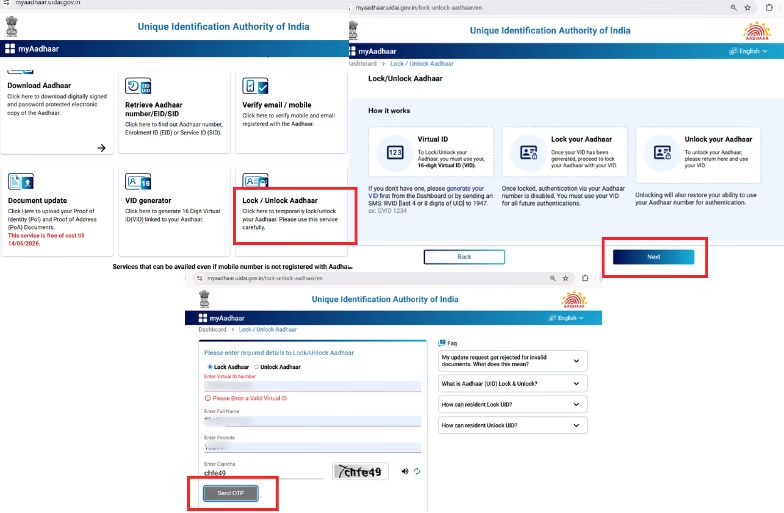
- Go to https://myaadhaar.uidai.gov.in and click on Lock/Unlock Aadhaar under “My Aadhaar” services.
- Read the instructions and click Next.
- Enter your Virtual ID (VID), full name and pincode.
- Type the captcha and click Send OTP.
- Enter the OTP received on your registered mobile number and click on Lock Aadhaar.
Once your Aadhaar is locked, you will not be able to authenticate using your Aadhaar number. You will have to use the VID for any authentication.
Lock Aadhaar Using mAadhaar App
You can also lock your Aadhaar directly from the mAadhaar mobile app by following the steps:
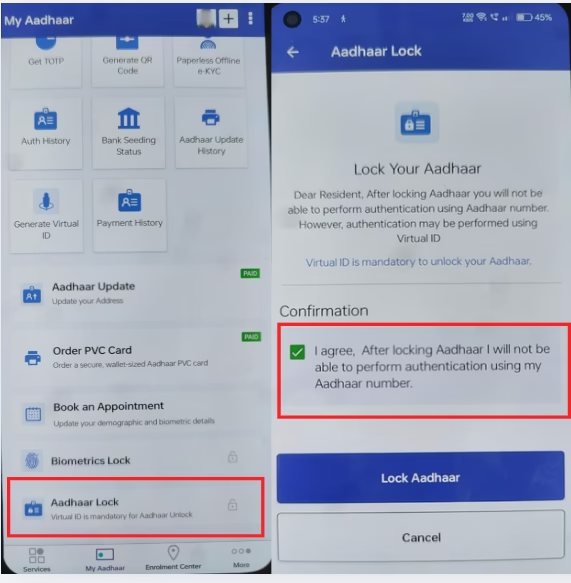
- Open the mAadhaar app and log in.
- Tap on Aadhaar Lock from the “My Aadhaar” tab.
- Read the confirmation message and check “I agree”.
- Lastly, tap Lock Aadhaar to complete the process.
After all of this, Aadhaar-based authentication will be disabled. You can unlock your Aadhaar anytime from the “Unlock” section using your VID.
Locking your Aadhaar is a smart security step to prevent unauthorized use of your personal information. Whether you do it through the UIDAI website or the mAadhaar app, the process is quick, secure and reversible anytime.
FAQs
- What is a Virtual ID (VID)?
A VID is a temporary 16-digit number linked to your Aadhaar. It can be used instead of your Aadhaar number for authentication.
- How can I generate my VID?
You can generate it on the UIDAI website or the mAadhaar app by selecting Generate Virtual ID in the application.
- Can I unlock my Aadhaar later?
Yes. You can unlock it anytime using the same steps. Just select Unlock Aadhaar instead of Lock Aadhaar.
- How is the New Aadhaar App different from the old mAadhaar app?
Unlike mAadhaar, the new app supports consent-based data sharing, offline QR verification, face/biometric features and more privacy controls. Support for the old mAadhaar app is being phased out.
