





Apple has introduced ChatGPT support in Apple Music to help users find songs and playlists using simple text prompts. It allows users to discover music faster without searching manually.
What Is Apple Music’s ChatGPT Feature?
Apple Music’s ChatGPT feature lets users ask for music recommendations in simple language. Instead of typing song names or browsing genres, users can easily describe what they want to hear. ChatGPT processes the request and suggests songs or playlists from Apple Music.
Prerequisites To Use ChatGPT In Apple Music
Before using this feature, users need a few things in place:
- An active Apple Music subscription
- A supported iPhone, iPad, or Mac
- Siri enabled on the device
- Apple Intelligence and ChatGPT access enabled
How To Connect Apple Music With ChatGPT?
Follow these steps to link Apple Music with ChatGPT and start discovering music using AI prompts.
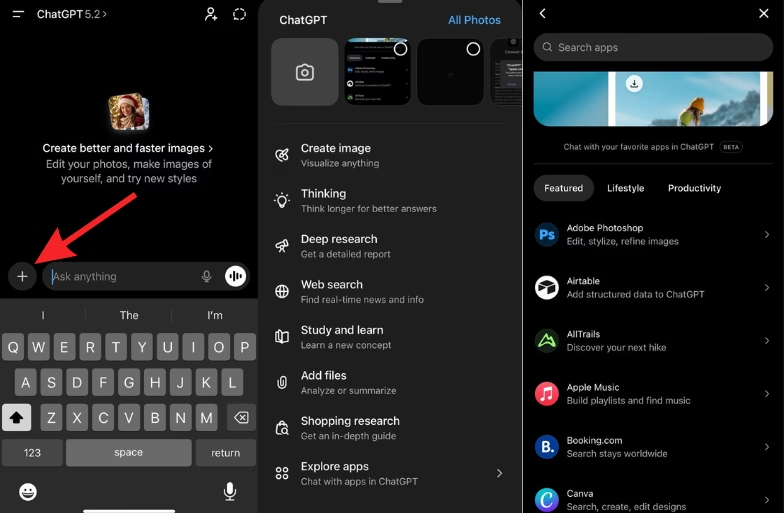
1: Open The ChatGPT App
Open the ChatGPT app on your iPhone. Make sure you are signed in to your account.
2: Tap on the “+” Icon
On the main screen, first click on the “+” icon, scroll down and tap Explore apps. This option appears under features like Create image and Web search.
3: Find Apple Music
In the Explore apps section, browse the list or use the search bar. Tap on Apple Music. This option appears with the description “Build playlists and find music”.
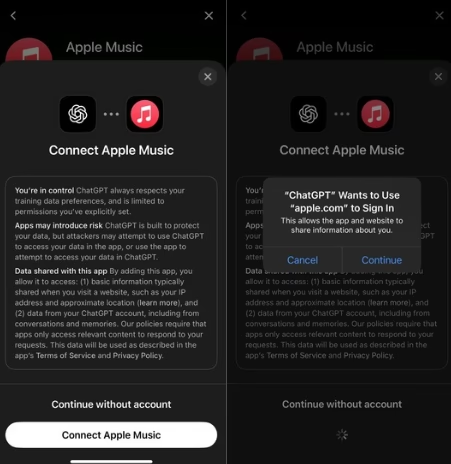
4: Select “Connect Apple Music”
Tap on Connect Apple Music. The app will begin the linking process between ChatGPT and Apple Music.
5: Sign In Using Apple ID
A pop-up will appear asking permission for ChatGPT to use apple.com to sign in. Tap Continue and sign in using your Apple ID.
6: Grant Permissions
Allow the required permissions so ChatGPT can access Apple Music features such as playlists and recommendations.
Once completed, Apple Music will be connected to ChatGPT.


Apple Music’s ChatGPT integration makes music discovery easier. Users can describe what they want to hear instead of searching manually. As Apple expands Apple Intelligence, this feature is expected to improve further.
FAQs
Is ChatGPT In Apple Music Available To All Users?
No. It is available on supported devices with Apple Intelligence enabled.
Do Users Need A Separate ChatGPT Account?
No. The feature works through Apple’s built-in integration.
Can ChatGPT Play Songs Directly In Apple Music?
Yes. It can suggest and play songs or playlists through Siri.
Does This Feature Replace Apple Music Search?
No. It works alongside existing search and discovery tools.