


Microsoft has now given Windows 11 users the freedom to remove Copilot from their PCs. Earlier, this feature was not available to users. This change came after many consumers shared their feedback, saying they did not want the AI assistant pinned to their desktop. The option has been made available through a new system update for Windows 11. The update allows users to uninstall Copilot directly from Settings, without needing any command-line tools. This gives users more control over their system and personal experience.
How to Remove Copilot From Windows 11
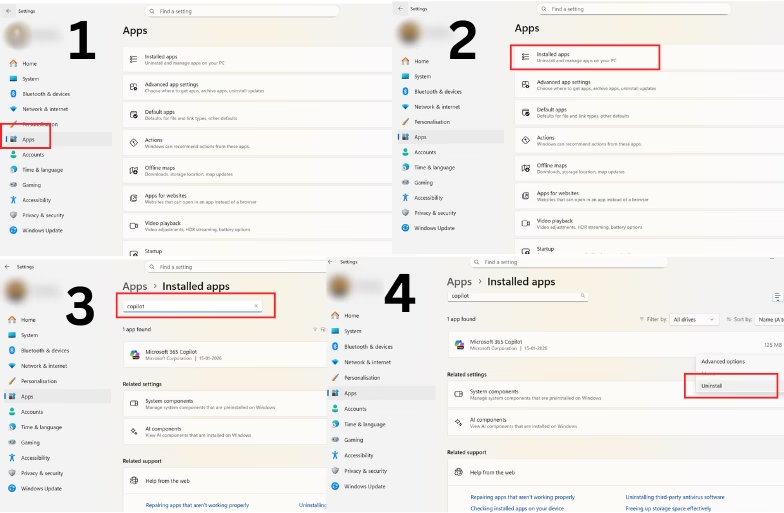
To easily remove Copilot, follow these simple steps:
- Go to “Apps” in Settings.
- Click on “Installed Apps.”
- Type “Copilot” in the search bar and click on the three-dot menu next to Microsoft Copilot.
- Select “Uninstall,” and you’re good to go
After completing these steps, Copilot will be removed from your Windows 11 PC. You can reinstall it later from the Microsoft Store if you change your mind.
Why Microsoft Added The Option
The decision came after several months of user feedback. Many people wanted to declutter their desktop and have more choice in using AI tools. By allowing users to uninstall it, Microsoft has made Windows 11 more flexible and user-friendly. This change also shows that the company is listening to its users and refining the overall experience based on feedback.
Availability Of The Update
The option to remove Copilot is currently rolling out with the latest Windows 11 update. It will gradually reach all eligible devices. Users who do not see the feature yet can check for updates manually by going to Settings → Windows Update → Check for updates.
With this feature, Microsoft has taken a step towards giving users more control over their PCs. Those who do not use Copilot can now remove it in a few simple steps, making their Windows 11 experience cleaner and more personal.
